Showing posts with label Network Monitoring. Show all posts

23.8.11

Firefox clear the cache

The Firefox cache temporarily stores images, scripts, and other parts of websites while you are browsing. This article describes how to clear the Firefox cache.

To clear your history (i.e. cookies, browsing history, cache, etc.) all at once
As you browse the web, Firefox helpfully remembers lots of information for you – sites you've visited, files you've downloaded and more. All of this information is called your history. However, if you are using a public computer or share a computer with someone, you may not want others to be able to see these kinds of things.

This article explains what information is stored in your history and gives you step-by-step ways to clear all of part of it. To temporarily have Firefox not store any history

Firefox Private Browsing

As you browse the web, Firefox helpfully remembers lots of information for you – sites you've visited, files you've downloaded and more. However, there may be times when you don't want other users of your computer to see this information. For example, if you share a computer with someone and have been shopping for their birthday present.

Private Browsing allows you to browse the Internet without saving any information about which sites and pages you’ve visited. This article explains what information is not saved when in Private Browsing and gives you step-by-step instructions for using it.
Warning: Private Browsing doesn't make you anonymous on the Internet. Your internet service provider, employer, or the sites themselves can still track the pages you visit. Also, Private Browsing doesn't protect you from keyloggers or spyware that may be installed on your computer.

8.7.11

Network protocol analyzer detect files from tcpdump

Wireshark is a network packet analyzer. It offers live capture and offline analysis.
You can export select packet bytes.
From a network interface, you can capture live packet data
This network protocol analyzer is able to detect files from tcpdump.
This open source program runs on Windows and the Mac platform.
Offers filtering and sorting options.
Free packet sniffer. Promiscuous mode is supported.
Ability to search for packets on many criteria.
Network protocol analyzer detect files from tcpdump

For security experts, Wireshark is considered one of the best open source projects in the world. Once you have captured some packets, this free network sniffer watches the packets being sent on your local area network. Useful for administrators and developers, Wireshark is ideal for network troubleshooting and protocol development. One of the most popular open source security tool, according to a recent study conducted by insecure.org. You can identify login problems that may occur in the future. Analysis of more expensive packet sniffers. Data display can be refined using a display filter.
Info : wireshark.org
Download : wireshark.org

Network Analyzer Traffic on a LAN or a DSL internet connection

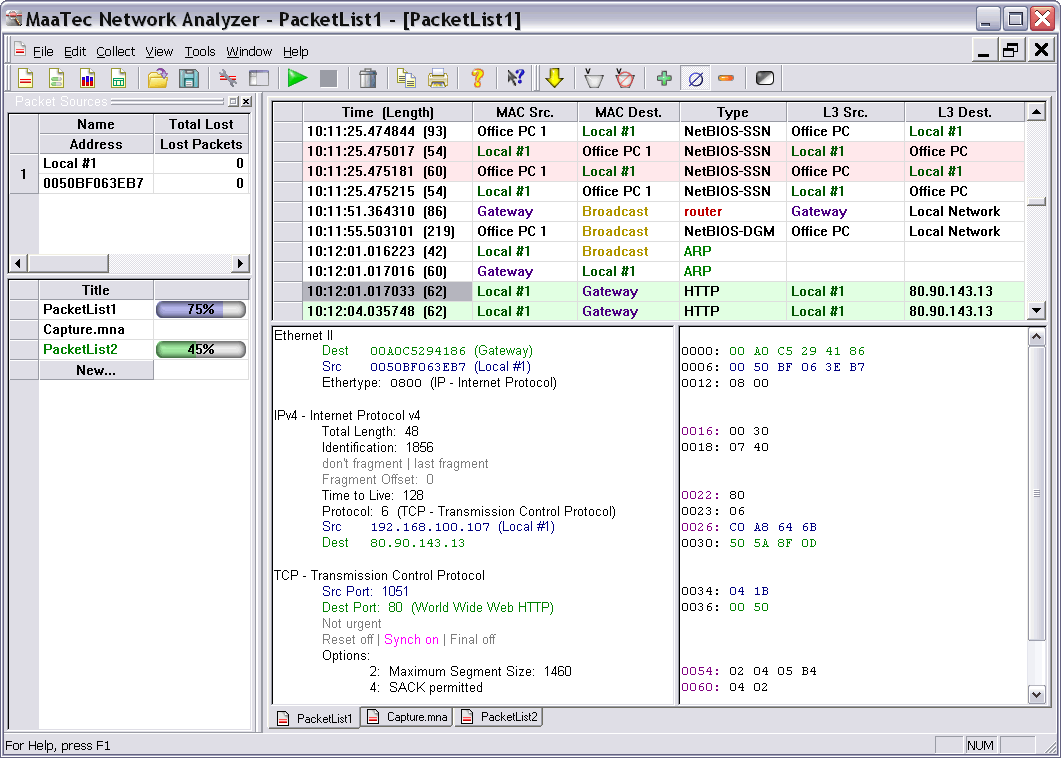
The MaaTec Network Analyzer is a tool that allows to capture, save, and analyze network traffic on a LAN or a DSL internet connection. You can use it for network troubleshooting, to analyze an existing network infrastructure, or for long-term network monitoring. The Network Analyzer combines following major components in one application:
-Protocol Analyzer (or 'packet sniffer') with real-time display
-Real-Time Statistics (displayed in tables with sortable columns)
-Scheduled Collection of protocol data into one or more files (Pro Version)
-Network Load over Time Statistics (per system, protocol, connection, etc.) (Pro Version)
-Network Report Generator (Pro Version)

Click on the pictures to open full size screenshots or a demo network report that was created with the application's report generator.

Network Analyzer Feature Highlights

Click here for a version history
New: The VLAN ID filter and VLAN statistics allow an even better analysis of virtual local area networks.
Support for Windows® Vista operating systems including 64-bit versions.
Scheduled Collector in the Pro version that allows manual or scheduled direct to disk packet capturing.
Support for files that are larger than 2 GB.
Network load over time statistics with history and configurable chart types, display for example the top 9 traffic causers (systems, protocols, etc.) during a configurable period of time in a clear stacked bar chart.
Punycode support in the DNS decoder, address database update via DHCP, new connection statistics, new optional 'Easy Statistics Mode' that displays only commonly used statistics modules with better understandable names.
Network Reports in HTML or XHTML format.
Reports with charts and multiple data tables.
Report generation can be controlled with command-line options and can be started in the background with the Windows® Task Scheduler.
Real-time network traffic statistics (25 different statistics modules available).
Scheduled network traffic reports.
Award-winning help system RoboHelp Award
Online view of incoming packets (Analyze, decode, and filter network packets while data collection is running).
IPv4 names are resolved by analyzing the incoming name service packets (without additional network traffic).
Multiple data color options (for data source, address names, protocol names, and background color)
Easy to use filter dialog.
Supports multiple network cards in one or multiple windows.
High performance due to assembler optimization and genuine new filter design.
Open multiple views with different filters and online packet display without performance degradation.
Capture full-speed 100 MBit/s even with older systems without losing data.
Unique new packet information display in splitted window.
Dump packet information with different detail levels.
Boot-free and Setup-free installation possible (just copy and start).
Customizable columns and display of relative time and lower layer protocols in the packet list view.
Advanced ISO OSI decoders.

System Requirements
32-bit Windows® 98 / ME / NT 4 / 2000 / XP / 2003 / Vista / 2008 / Windows 7,
64-bit Windows® XP / 2003 / Vista / 2008 / Windows 7,
486-compatible processor,
400 MHz processor for 100 MBit LANs recommended,
32 MB of free RAM when the OS is running,
MS HTML Help and IE 4 needed to use the help file.
Decoded Network Protocols

IPv4, IPv6, TCP, UDP, IPX, PPP, PPPoE, PPTP, ICMP, ICMPv6, IGMP, LCP, CHAP, CCP, CBCP, ARP, RIP, IPX-RIP, DNS, DHCP, GRE, bootpc, bootps, NetBIOS, NetBIOS-NS, LLMNR, SMB/CIFS, Microsoft-DS, NMPI, LLC, ITU-T X.233 CLNP, X.224 OSI TP, ISO 9542 ES-IS, ISO 10589 IS-IS, Telnet, TFTP, Teredo.

And as text-decode: HTTP, FTP, POP2, POP3, IMAP, IMAP3, MSNP, NNTP, SMTP, SSDP, WS-Discovery, ICSLAP.
Download : maatec.com

HTTP Sniffer Network Monitoring Software

HTTP Sniffer Network Monitoring Software
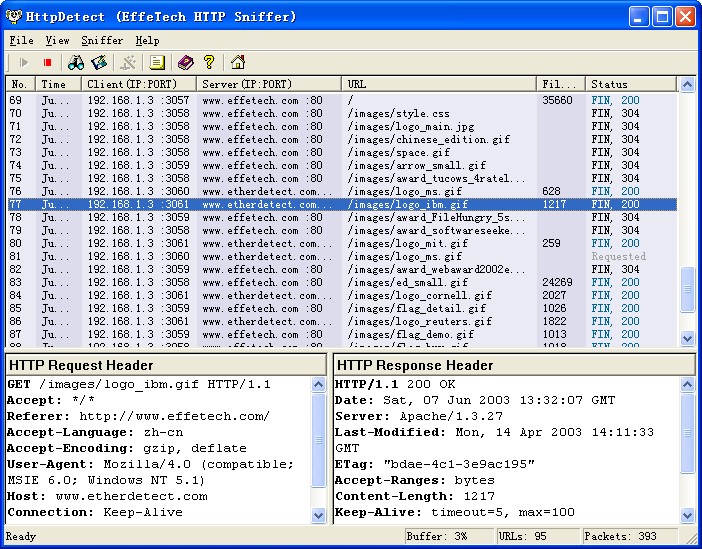
EffeTech HTTP Sniffer is a HTTP protocol packet sniffer, network analyzer and file reassembly software based on Windows platform. Unlike most other sniffers, it is dedicated to capture IP packets containing HTTP protocol and to reassemble the HTTP communications and files sent through HTTP protocol. Its smart real-time analyzer enables on-the-fly content viewing while monitoring and analyzing. It can also parse and decode HTTP protocol, and generate a web traffic report for reference.

By delivering an ideal mix of power, ease of use, and functionality, the award-winning EffeTech HTTP Sniffer has become the preferred choice of managers, network administrators and developers worldwide. No matter you are a professional or a rookie, you can easily get HTTP web traffic report on your network.
Info : effetech.com
Download : effetech.com

Twitter Delicious Facebook Digg Stumbleupon Favorites More