Showing posts with label Software. Show all posts

27.11.11

How to Change Windows 7 Theme : Windows Theme Installer

Windows can be easily customized with different wallpapers, window skins and other eyecandy contained in visual themes. Unfortunately these themes often come from third-party developers and won't work on Windows unless you do some system tweaking before – something that's off-putting for many users. And here's where Windows Theme Installer can lend you a hand.
Windows Theme Installer

How to use Windows Themes Installer:

INSTALL A THEME AND CHANGE SYSTEM FILES:
1. Run the tool as Administrator.
2. Select the options which you want to install:
i) Theme
ii) Explorer.exe
iii) OobeFldr.dll
iv) ExplorerFrame.dll
v) Shell32.dll
3. Once you have selected the options, click on the “Browse” button and browse for the file of the desired option.
4. Now click on “Install Theme” button to install the theme and replace the system files.

RESTORE DEFAULT SYSTEM FILES:
To restore the default system files click on the “Restore Default System Files” button.

REMOVE A THEME:
To remove a theme select the theme which you want to remove from the list and click on the “Remove Theme” button.

APPLY A THEME:
To apply a theme select the theme which you want to apply from the list and click on the “Apply Theme” button.

It is always a good idea to create a system restore point first before making any changes to your system. Should the need arise, the System File Checker Utility will help you replace your system files with ‘good original’ Windows system files.

Download

23.8.11

Firefox Private Browsing

As you browse the web, Firefox helpfully remembers lots of information for you – sites you've visited, files you've downloaded and more. However, there may be times when you don't want other users of your computer to see this information. For example, if you share a computer with someone and have been shopping for their birthday present.

Private Browsing allows you to browse the Internet without saving any information about which sites and pages you’ve visited. This article explains what information is not saved when in Private Browsing and gives you step-by-step instructions for using it.
Warning: Private Browsing doesn't make you anonymous on the Internet. Your internet service provider, employer, or the sites themselves can still track the pages you visit. Also, Private Browsing doesn't protect you from keyloggers or spyware that may be installed on your computer.

Tabs And Windows Firefox Home

Why weren't my tabs and windows restored?

If you had tabs and windows open when you closed Firefox, the new default Firefox home page will have a Restore Previous Session button on it. To get your tabs and windows back, just click it. Restore Previous Session - Win1
If you don't use the default Firefox home page, you can restore your tabs and windows from the History menu:

At the top of the Firefox window, click the Firefox button, go over to History (History menu in Windows XP) and select Restore Previous Session. Restore Previous Session - Win2

For more info about how session restore works, see Session Restore and Firefox does not ask to save tabs and windows on exit.
Why are the menus (File, Edit, View, etc.) missing?

If you're using Windows 7 or Windows Vista, you now have an orange Firefox button that takes the most common functions and puts them in one menu.

To temporarily show the old style menus, just press the Alt key.
To have them shown all the time, right-click on an empty section of the Tab Strip and check Menu Bar in the pop-up menu.
Menu Bar - Win

How do I get the orange Firefox button?

If you're using Windows XP or you've customized your toolbars, you can switch to using the orange Firefox button by:

Right-clicking on an empty section of the Tab Strip and unchecking Menu Bar in the pop-up menu.

See Menu bar is missing for problems with the Menu bar and check out How do I customize the toolbars? for more about arranging Firefox to fit your needs.
What happened to the back, refresh and home buttons?

To streamline the navigation section and group buttons by task, a few things have changed:

The back button drop-down menu can be accessed by clicking and holding on the back button.
The stop and refresh buttons are combined into one button on the right end of the location bar.
The home button is to the right of the location bar.

Nav Buttons - Win
Not crazy about this arrangement? No problem. It's your browser, make Firefox work the way you do. See How do I customize the toolbars? for more about customizing buttons and toolbars.

Right-click on an empty section of the Tab Strip, select Customize... and the Customize Toolbar window will open.
Drag, drop and rearrange items.
To add an item to a toolbar, drag it from the Customize Toolbar window onto the toolbar where you want it to appear.
To remove an item from a toolbar, drag it to the Customize Toolbar window.
To move an item in a toolbar, drag it where you want it to appear.
When you are finished making changes, click Done to close the Customize Toolbar window.

Custom Buttons - Win
What happened to the Status Bar?

The Status Bar at the bottom of the Firefox window has changed. The new Status Bar only shows page loading activity and link previews. When neither of those are needed it simply disappears. Please see What happened to the Status Bar? for more.
Status Bar link - win
Status Bar load - win
Why do my fonts look blurry?

If you are using Windows Vista or Windows 7, text in Firefox may appear blurry. This is usually due to Windows ClearType not being turned on.

In Windows, click Small Vista Logo and type cleartype in the search box.
Click Adjust ClearType text to open the ClearType control panel.
Check Turn on ClearType and then Next to fine tune your settings.
After you fine tune the ClearType settings, click Finish to accept them.

For more details see, Fonts look blurry. It's also possible that you are also experiencing issues related to outdated graphics card drivers. See How do I upgrade my graphics drivers? for more information, including how to disable hardware acceleration in Firefox as a possible workaround.
Some of my add-ons were disabled. What can I do?

After upgrading, Firefox checks for new versions of your add-ons and disables those that are no longer compatible. By default it will continue to check for new versions periodically. For more info, see Add-ons are disabled after updating Firefox.

Some add-ons (like Firebug) have completely different versions for new versions of Firefox so the auto-update feature won't work. To check for a new version:

At the top of the Firefox window, click on the Firefox button (Tools menu in Windows XP), and then click Add-ons. The Add-ons Manager tab will open.
In the Add-ons Manager tab, select the Extensions panel.
Click the more link in the add-on's description.
In the detail view, click the homepage link to be taken to the add-on's website where you can search for a newer version.

Where are my bookmarks?

Relax. If you were using the Bookmarks Toolbar to hold your favorite sites you may just have to turn it back on:

Right-click on an empty section of the Tab Strip and check Bookmarks Toolbar in the pop-up menu.
Bookmarks Toolbar - Win

You can also view and organize your bookmarks in the Library window.

Click the Bookmarks button Bookmarks button win 2 on the right side of the navigation toolbar (Windows XP: click the Bookmarks menu) and select Show All Bookmarks to open the Library window.

Bookmarks Button win

For more about using bookmarks, including tagging and organizing, see How do I use bookmarks?
Why are tabs on top of the location bar now?

The main reason is that it just makes more sense — especially with features like App Tabs and the Add-ons Manager. For details on this change, see Why are tabs on top?
How do I put tabs back like they used to be?

Right-click on an empty section of the Tab Strip and uncheck Tabs on Top in the pop-up menu.

6.8.11

No sound after update Windows : Sound Aufzeichnen Spielen

windows update u. sound stellt sich ab. Soundcard Zoom r 16
Ich lösche das Windowsupdate, also uhr zurückgehen, dann funktioniert die Soundcard wieder
- english. Windows update, than noch sound anymore . soundcard zoom r16
When I delete the windows update, than i can hear again. Help

Which updates were installed?

Run the Microsoft fix it “Diagnose and repair sound playback problems automatically “: http://support.microsoft.com/mats/no_sound

Also here is some online help on the topic: http://windows.microsoft.com/en-us/windows7/Tips-for-fixing-common-sound-problems

1.8.11

Stub has stopped working Error message

Can you do the following for me please?
OTL
Download OTL to your desktop.
Double click on the icon to run it. Make sure all other windows are closed to let it run uninterrupted.
When the window appears, underneath Output at the top change it to Minimal Output.
Under the Standard Registry box change it to All.
Check the boxes beside LOP Check and Purity Check.
Click the Run Scan button. Do not change any settings unless otherwise told to do so. The scan wont take long.
When the scan completes, it will open two notepad windows. OTL.Txt and Extras.Txt. These are saved in the same location as OTL.
Please copy (Edit->Select All, Edit->Copy) the contents of these files, one at a time, and post it with your next reply.

CKScanner

Please download CKScanner from here to your Desktop.

Make sure that CKScanner.exe is on the your Desktop before running the application!

Double-click on CKScanner.exe and click Search For Files.
After a very short time, when the cursor hourglass disappears, click Save List To File.
A message box will verify the file saved
CKFiles.txt will be created on your desktop, copy and paste the contents of this into your next post

Malwarebytes Anti-Malware

Download and install MBAM from here
Run a full scan

8.7.11

0xC0000034 error message when you try to install Windows 7 SP1

This article describes a hotfix that prevents the following issue. For more information about how to recover from this issue after it has already occurred, click the following article number to view the article in the Microsoft Knowledge Base:
975484 Your computer may freeze or restart to a black screen that has a "0xc0000034" error message after you install Service Pack 1 on Windows 7 or Windows 2008 R2
Consider the following scenario:

You install Windows 7 Service Pack 1 (SP1) or Windows 2008 R2 Service Pack 1 (SP1) on a computer.
You install some other updates before you restart the computer to complete the installation process. Or, the service pack is installed at the same time as other updates by using Windows Server Update Services (WSUS).

In this scenario, the computer may stop responding or restart. If the computer restarts, you receive an error message that resembles the following on a black screen:
0xC0000034 error message when you try to install Windows 7 SP1

0xC0000034

Note If the computer stops responding and you restart the computer, you receive the same error message.

All supported x86-based versions of Windows 7
Download

All supported x64-based versions of Windows 7
Download

All supported x64-based versions of Windows Server 2008 R2
Download

All supported IA-64-based versions of Windows Server 2008 R2
Download

For more information about how to download Microsoft support files, click the following article number to view the article in the Microsoft Knowledge Base:
119591 How to obtain Microsoft support files from online services
Microsoft scanned this file for viruses. Microsoft used the most current virus-detection software that was available on the date that the file was posted. The file is stored on security-enhanced servers that help prevent any unauthorized changes to the file.

Notes

You must install this update package on a computer that is running Windows 7 or Windows Server 2008 R2 operating system. You cannot install this update on an offline image.
In a Windows Server Update Services (WSUS) environment, this update is marked as "Exclusive." You will only be offered this update if you have installed all other updates that are marked as "Important."

Prerequisites
To apply this update, you must be running one of the following operating systems:

Windows 7
Windows 7 Service Pack 1 (SP1)
Windows Server 2008 R2
Windows Server 2008 R2 Service Pack 1 (SP1)

Registry information
To use the update in this package, you do not have to make any changes to the registry.
Restart requirement
You do not have to restart the computer after you apply this update.
Update replacement information
This update does not replace a previously released update.
Update removal information
You cannot remove this update.
File information
The global version of this hotfix installs files that have the attributes that are listed in the following tables. The dates and the times for these files are listed in Coordinated Universal Time (UTC). The dates and the times for these files on your local computer are displayed in your local time together with your current daylight saving time (DST) bias. Additionally, the dates and the times may change when you perform certain operations on the files.

Network protocol analyzer detect files from tcpdump

Wireshark is a network packet analyzer. It offers live capture and offline analysis.
You can export select packet bytes.
From a network interface, you can capture live packet data
This network protocol analyzer is able to detect files from tcpdump.
This open source program runs on Windows and the Mac platform.
Offers filtering and sorting options.
Free packet sniffer. Promiscuous mode is supported.
Ability to search for packets on many criteria.
Network protocol analyzer detect files from tcpdump

For security experts, Wireshark is considered one of the best open source projects in the world. Once you have captured some packets, this free network sniffer watches the packets being sent on your local area network. Useful for administrators and developers, Wireshark is ideal for network troubleshooting and protocol development. One of the most popular open source security tool, according to a recent study conducted by insecure.org. You can identify login problems that may occur in the future. Analysis of more expensive packet sniffers. Data display can be refined using a display filter.
Info : wireshark.org
Download : wireshark.org

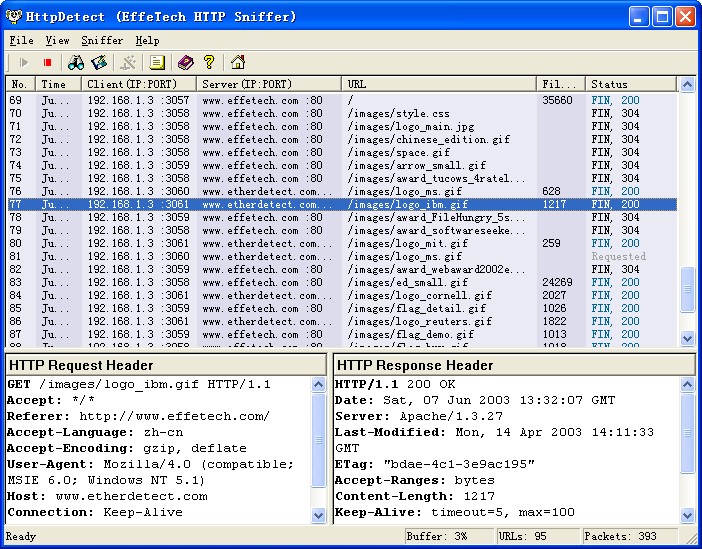
HTTP Sniffer Network Monitoring Software

HTTP Sniffer Network Monitoring Software
EffeTech HTTP Sniffer is a HTTP protocol packet sniffer, network analyzer and file reassembly software based on Windows platform. Unlike most other sniffers, it is dedicated to capture IP packets containing HTTP protocol and to reassemble the HTTP communications and files sent through HTTP protocol. Its smart real-time analyzer enables on-the-fly content viewing while monitoring and analyzing. It can also parse and decode HTTP protocol, and generate a web traffic report for reference.

By delivering an ideal mix of power, ease of use, and functionality, the award-winning EffeTech HTTP Sniffer has become the preferred choice of managers, network administrators and developers worldwide. No matter you are a professional or a rookie, you can easily get HTTP web traffic report on your network.
Info : effetech.com
Download : effetech.com

11.6.11

Windows 7 gen_ml.dll error with KMPlayer

gen_ml.dll (media library winamp plugin) problem is a common issue in Windows Vista/Windows 7. Playback seemed to work for me, but startup was extremely slow and the screen froze for ten seconds. To avoid it you can do one of the following:

Delete gen_ml.dll from plugins folder if you don’t need it (Recommended) (I tried renaming the file, but it still caused problems)
Install KMP in a folder with admin rights.
Run KMP with admin rights (right click on file -> properties)
Disable UAC in Windows Vista (not recommended)

Via: Access Violation on startup (gen_ml.dll)

Common DLL Errors and Fixes in Windows Vista

DLL or Dynamic Link Library files are used by Windows operating systems and applications installed on them to store functions and codes that can be called on whenever required. There are hundreds of DLL files on a Windows system and several conditions that may result in DLL errors. Some of the common causes of DLL errors are:

Missing, corrupt, or damaged DLL.
Overwriting or deletion of one or more DLLs during program install or uninstall.
Faulty or corrupt applications.
Malware infections.
Erroneous or invalid entries in the registry.

To understand DLL errors better, let’s have a look at some common DLL errors and the methods you can use to fix them. Here are some most common:

Msvcr71.dll Error
Msvcp71.dll Error
Shell32.dll Error
Msoe.dll Error
Simple Tips to Prevent and Fix DLL Errors

8.5.11

How to make Windows 7 automatically log on?

If you are just running a home computer for gaming or something unimportant, you might not want to have to log in every single time you reboot your computer. There’s an easy tweak that will let you auto login. First, we’ll need to get to the Advanced User Accounts Control Panel to get to this setting. I think there’s a registry tweak as well, but that seems like too much work.

In the start menu search box, type in netplwiz, hit enter, and you’ll see the user accounts window.

Note: If this does not work, you can type in control userpasswords2 instead.

Uncheck the box that says “Users must enter a user name and password to use this computer”, and then hit Apply. You’ll see a username and password box. Enter in the appropriate information here and hit OK.

This works as well for Vista and XP.

Connectivity problems in Windows XP Service Pack 2

Basic troubleshooting
This section of the article contains basic troubleshooting methods to resolve Bluetooth issues that may occur after you install Windows XP Service Pack 2.

The troubleshooting steps in this section are appropriate for beginning to intermediate users. If the troubleshooting steps in this section do not resolve your issue, you may want to try the steps in the "Advanced troubleshooting" section later in this article.

This section of the article discusses the following topics:

Steps to try first
Steps to try if your Bluetooth device is not detected when you add the device

Steps to try first
Try the following basic troubleshooting steps first. They may quickly resolve your issue.

If your Bluetooth device uses batteries, make sure that your batteries are charged.
If your Bluetooth device uses a transceiver that connects to your computer through a USB port, try connecting the transceiver to another USB port on your computer.
If there are multiple Bluetooth devices connected to your computer, temporarily remove the devices that you are not troubleshooting. If there are additional USB devices, try removing any USB devices that you do not have to have installed during the troubleshooting process. If you have multiple devices that are connected by using USB, this can interfere with a Bluetooth transceiver.
Verify that the Bluetooth device that you are troubleshooting is powered on and that it is enabled.

Steps to try if your Bluetooth device is not detected when you add the device
Method 1: Make sure that Windows XP Service Pack 2 is installed
Verify that you have Windows XP SP2 installed. To do this, follow these steps:

Click Start, and then click Run.
In the Open box, type winver.exe, and then click OK.
In the About Windows dialog box, verify that Windows XP SP2 is installed.

About Windows dialog box

If Windows XP Service Pack 2 is listed, try Method 2. If If Windows XP Service Pack 2 is not listed, install the service pack again. To install Windows XP Service Pack 2, follow these steps:
In Internet Explorer, visit the following Microsoft Web site:
http://update.microsoft.com/
If any important updates are available for your computer, install them. To do this, click Install updates. If you are prompted to restart your computer after all the updates are installed, restart your computer.

Important You might have to restart your computer after you install certain updates. When you restart your computer, the content that you are now viewing will no longer be displayed. So, before you continue, you might find it helpful to create a shortcut to this Web page on your desktop so that you can easily return to this page by double-clicking the shortcut. To create a shortcut to this Web page on your desktop, follow these steps:

Right-click this page, and then click Create Shortcut.
In the Internet Explorer dialog box, click Yes to create a shortcut on your desktop.

Method 2: Make sure that your Bluetooth device is discoverable and that your computer is set to enable Bluetooth devices to connect to your computer

Right-click the Bluetooth icon in the notification area, and then click Open Bluetooth Settings.

Bluetooth icon

Note If the Bluetooth icon is not in the notification area, click Start, click Run, type bthprops.cpl, and then click OK. To use the bthprops.cpl command, make sure that Windows XP SP2 supports your Bluetooth adapter and the Bluetooth adapter has been successfully installed on your Windows XP SP2-based computer. For more information about how to install the Bluetooth adapter and Bluetooth devices in Windows XP Service Pack 2, click the following article number to view the article in the Microsoft Knowledge Base:
883259 How to install and configure Bluetooth devices in Windows XP Service Pack 2
On the Options tab, click to select the Turn discovery on check box, and then click Apply.

Bluetooth Devices dialog box

To enable Bluetooth devices to connect to your computer, click to select the Allow Bluetooth devices to connect to this computer check box, and then click OK.

Bluetooth Devices dialog box

Advanced troubleshooting steps
This section is intended for advanced computer users. If you are not comfortable with advanced troubleshooting, you might want to ask someone for help or contact support. For information about how to do this, visit the following Microsoft Web site:
http://support.microsoft.com/contactus/

6.5.11

Adobe Audition CS5.5 v4.0

Adobe® Audition® CS5.5 software delivers the professional tools you need to make your video and audio productions sound their best. Handle a wide range of audio production tasks efficiently, including recording, mixing, and sound restoration. Bring new efficiency to your audio post-production workflows with intuitive multitrack recording, editing, and mixing capabilities; greater workflow flexibility; and optimized performance in Adobe® Audition® CS5.5 software.

System requirements
Windows
Intel® Pentium® 4 or AMD Athlon® 64 processor (Intel Core™2 Duo or AMD Phenom® II recommended)
Microsoft® Windows® XP with Service Pack 3; Windows Vista® Home Premium, Business, Ultimate, or Enterprise; or Windows 7
1GB of RAM; 2GB for HDV and HD playback
2GB of available hard-disk space for installation; additional free space required during installation (cannot install on removable flash storage devices)
1280x800 display with OpenGL 2.0–compatible graphics card
Sound card compatible with ASIO protocol or Microsoft WDM/MME
DVD-ROM drive
QuickTime 7.6.2 software required for QuickTime features
Broadband Internet connection required for online services and to validate Subscription Edition (if applicable) on an ongoing basis.
DuckLoad
http://takemyfile.com/1222485
-=-=-=-=-=--=-=-=-=-=--=-=-=-=-=-
FileKeen
http://takemyfile.com/1222486
-=-=-=-=-=--=-=-=-=-=--=-=-=-=-=-
FileSonic
http://takemyfile.com/1222487
-=-=-=-=-=--=-=-=-=-=--=-=-=-=-=-
Turbobit
http://takemyfile.com/1222488
-=-=-=-=-=--=-=-=-=-=--=-=-=-=-=-
UpLoaded.To
http://takemyfile.com/1222489
-=-=-=-=-=--=-=-=-=-=--=-=-=-=-=-
JumboFiles
http://takemyfile.com/1222490
-=-=-=-=-=--=-=-=-=-=--=-=-=-=-=-
RapidShare
http://takemyfile.com/1222491
-=-=-=-=-=--=-=-=-=-=--=-=-=-=-=-
Zshare
http://takemyfile.com/1222492
-=-=-=-=-=--=-=-=-=-=--=-=-=-=-=-
MegaUpload
http://takemyfile.com/1222493
-=-=-=-=-=--=-=-=-=-=--=-=-=-=-=-
IFile.It
http://takemyfile.com/1222494
-=-=-=-=-=--=-=-=-=-=--=-=-=-=-=-

Adobe InDesign CS5.5 v7.5

Adobe® InDesign® CS5.5 software lets you design and preflight engaging page layouts for print or digital distribution with built-in creative tools and precise control over typography. Integrate interactivity, video, and audio for playback on tablets, smartphones, and computers. Create and preview digital magazines, newspapers, and catalogs with engaging elements such as 360° object rotation and image panoramas for a wide variety of tablets. Upload to Adobe Digital Publishing Suite for further production and distribution. Access the hosted services of Adobe Digital Publishing Suite from within InDesign to publish engaging digital documents for a range of tablet devices.

System requirements
Windows
Intel® Pentium® 4 or AMD Athlon® 64 processor
Microsoft® Windows® XP with Service Pack 2 (Service Pack 3 recommended); Windows Vista® Home Premium, Business, Ultimate, or Enterprise with Service Pack 1; or Windows 7
1GB of RAM (2GB recommended)
Adobe InDesign
1.6GB of available hard-disk space for installation; additional free space required during installation (cannot install on removable flash storage devices)
1024x768 display (1280x800 recommended) with 16-bit video card
DVD-ROM drive
Adobe® Flash® Player 10 software required to export SWF files
Broadband Internet connection required for online services and to validate Subscription Edition (if applicable) on an ongoing basis.
DuckLoad
http://takemyfile.com/1224414
http://takemyfile.com/1224415
http://takemyfile.com/1224416
http://takemyfile.com/1224417
http://takemyfile.com/1224418
-=-=-=-=-=--=-=-=-=-=--=-=-=-=-=-
FileKeen
http://takemyfile.com/1224369
http://takemyfile.com/1224370
http://takemyfile.com/1224371
http://takemyfile.com/1224372
http://takemyfile.com/1224373
-=-=-=-=-=--=-=-=-=-=--=-=-=-=-=-
FileSonic
http://takemyfile.com/1224374
http://takemyfile.com/1224375
http://takemyfile.com/1224376
http://takemyfile.com/1224377
http://takemyfile.com/1224378
-=-=-=-=-=--=-=-=-=-=--=-=-=-=-=-
Turbobit
http://takemyfile.com/1224379
http://takemyfile.com/1224380
http://takemyfile.com/1224381
http://takemyfile.com/1224382
http://takemyfile.com/1224383
-=-=-=-=-=--=-=-=-=-=--=-=-=-=-=-
UpLoaded.To
http://takemyfile.com/1224384
http://takemyfile.com/1224385
http://takemyfile.com/1224386
http://takemyfile.com/1224387
http://takemyfile.com/1224388
-=-=-=-=-=--=-=-=-=-=--=-=-=-=-=-
JumboFiles
http://takemyfile.com/1224389
http://takemyfile.com/1224390
http://takemyfile.com/1224391
http://takemyfile.com/1224392
http://takemyfile.com/1224393
-=-=-=-=-=--=-=-=-=-=--=-=-=-=-=-
RapidShare
http://takemyfile.com/1224394
http://takemyfile.com/1224395
http://takemyfile.com/1224396
http://takemyfile.com/1224397
http://takemyfile.com/1224398
-=-=-=-=-=--=-=-=-=-=--=-=-=-=-=-
Zshare
http://takemyfile.com/1224399
http://takemyfile.com/1224400
http://takemyfile.com/1224401
http://takemyfile.com/1224402
http://takemyfile.com/1224403
-=-=-=-=-=--=-=-=-=-=--=-=-=-=-=-
MegaUpload
http://takemyfile.com/1224404
http://takemyfile.com/1224405
http://takemyfile.com/1224406
http://takemyfile.com/1224407
http://takemyfile.com/1224408
-=-=-=-=-=--=-=-=-=-=--=-=-=-=-=-
IFile.It
http://takemyfile.com/1224409
http://takemyfile.com/1224410
http://takemyfile.com/1224411
http://takemyfile.com/1224412
http://takemyfile.com/1224413
-=-=-=-=-=--=-=-=-=-=--=-=-=-=-=-

Twitter Delicious Facebook Digg Stumbleupon Favorites More